How to troubleshoot embedded signup
Last updated Over 1 year ago
Facebook Business Account Creation - Common Errors & Resolutions
This document provides a comprehensive list of common errors encountered while creating Facebook Business Manager accounts, their causes, and actionable resolutions. If issues persist, please contact partnership.support@aisensy.com for further assistance.
1. Generic Error Message
Error: "An error occurred while processing this request. Please try again later."
Description: Business account creation could have failed due to various unknown reasons.
Resolution:
Try using a different Facebook account.
If the issue persists, contact: partnership.support@aisensy.com
2. Limit on Business Creation
Error: "You have reached the limit for the number of Businesses you can create at this time."
Description: Facebook limits the number of Business Accounts a user can create.
Resolution:
Use another Facebook account that hasn’t reached the limit.
3. New Facebook Account Restriction
Error: "Your Facebook account is too new to create a business account. Try again in an hour."
Description: Facebook imposes a cooldown period before new accounts can create Business Managers.
Resolution:
Wait at least 24 hours after creating a new Facebook account.
Alternatively, use an older Facebook account.
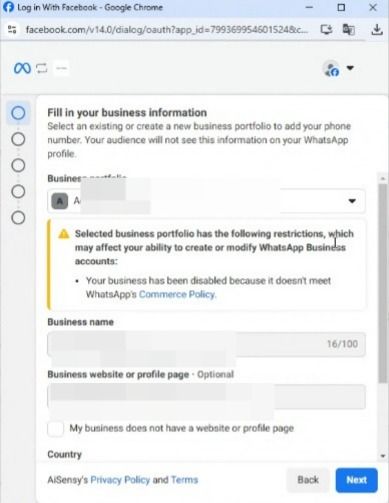
4. Facebook Rate Limit / Spam Flag
Error: "We limit how often you can post, comment or do other things in a given amount of time in order to help protect the community from spam. You can try again later."
Description: Facebook has temporarily restricted your account due to suspicious or spam-like activity.
Resolution:
Use another Facebook account that is not restricted.
5. Ads restriction while embedded signup
Error: "You're no longer allowed to use Facebook Products to advertise. You can't run ads, manage advertising assets or create new ad or business accounts."
Description: Your account has lost ad access due to violations or suspicious activity.
Resolution:
Use a different Facebook account with ad access privileges.
6. Payment Account Disabled
Error: "Your payment account is disabled."
Description: Facebook has disabled the payment profile due to past policy violations or issues.
Resolution:
Use another Facebook account with an active payment setup.
7. Business Creation Rate Limit
Error: "A User Can Only Create One Business User At One Time."
Description: You are attempting to create more than one Business Account simultaneously or too soon after a previous creation.
Resolution:
Use another Facebook account or wait before trying again.
8. Invalid Business Name
Error: "The name you chose for your business isn’t valid. Consider using xxx."
Description: Facebook has flagged the chosen business name as invalid.
Resolution:
Use variations of your business name, e.g.:
Use "PVT LTD" instead of "Private Limited"
Try different casing combinations (e.g., MyBusiness, My business)
Avoid using special characters or sensitive keywords
WhatsApp Business Account Creation – Error Documentation
This guide outlines common errors encountered during WhatsApp Business Account (WABA) creation via Meta platforms. Each error is accompanied by a description and resolution steps. These are applicable during onboarding, migration, or setup via the WhatsApp Business API.
1. Cannot Edit Verified Name
Error Message:
"Cannot Edit Verified Name: Name verification already in progress."Description:
Editing the display name is restricted while a name verification request is already under process, typically during migration from another provider.Resolution:
No action is required. Wait until the current name verification completes.
The display name will be locked temporarily and will automatically update once verified.
2. User Does Not Have Permission to Create WhatsApp Business Accounts
Error Message:
"User does not have permission to create WhatsApp Business Accounts."Description:
Your Facebook account lacks the Admin role on the selected Meta Business Account, which is required to create WhatsApp Business Accounts.Resolution:
Go to your Facebook Business Manager (FBM).
Navigate to Settings > People.
Verify that your account is listed and has Admin access.
If not, request Admin access or use another account with the appropriate role.
3. Limited Number of WhatsApp Business Accounts
Error Message:
"You can only create a limited number WhatsApp Business Accounts before your business and WhatsApp account verification is complete. You can create additional accounts after you are verified."Description:
Meta restricts the number of WABA accounts that can be created under an unverified Facebook Business Manager.Resolution:
Complete Facebook Business Manager verification.
Go to FBM > Settings > Business Info > Start Verification.
Alternatively, use a different FBM account that is already verified.
4. Meta Business Account Verification Failed
Error Message:
"We can't verify the Meta Business Account that you selected. Go back to the previous screen to select a different account, or go to Meta Business Manager for support."Description:
The selected Meta Business Account is not compliant with Meta’s policies or has failed verification, thus it cannot be used to create a WhatsApp Business Account.Resolution:
Recheck the selected Meta Business Account in the previous screen.
Choose another compliant and verified Meta Business Account.
If the issue persists, contact Meta Business Support for resolution.
WhatsApp Business API – Phone Setup & Verification Error Documentation
This document outlines common errors users may face during the Phone Setup and Phone Verification stages of WhatsApp Business Account configuration. Each entry includes a brief description and context to help resolve the issue effectively.
Phone Setup Errors
1. Phone Number Has Been Blocked
Error Message:
"Phone Number has been blocked. Please check alert prompt in WhatsApp Manager Overview or follow instructions in Business Support Home."Description:
The phone number has been blocked by WhatsApp and cannot be linked to a WABA (WhatsApp Business Account).Resolution:
Log in to WhatsApp Manager and check alerts.
Visit Meta Business Support Home for remediation steps.
You may need to use a different number if the issue persists.
2. Phone Number Limit Reached
Error Message:
"You have already linked the maximum number of phone numbers allowed for this Business Account. Delete a phone number to continue or request additional numbers. Learn more."Description:
WhatsApp restricts the number of phone numbers linked to a WABA based on business verification and account tier.Resolution:
Remove unused phone numbers in WhatsApp Manager.
To increase the limit, request an upgrade via Meta support or refer to Register Phone Number documentation.
3. Duplicate Phone Number
Error Message:
"This phone number already exists in your list of phone numbers."Description:
The phone number you're attempting to add is already registered under your WABA.Resolution:
Check existing phone numbers in your WhatsApp Manager account.
Avoid re-registering the same number.
4. Number Already Registered on WhatsApp
Error Message:
"This number is registered to an existing WhatsApp account. To use this number, disconnect it from the existing account..."Description:
The number is already active on WhatsApp Messenger, WhatsApp Business App, or another WhatsApp API setup.Resolution:
Uninstall WhatsApp or delete the account from the current app.
Wait up to 3 minutes after disconnecting, then retry the registration.
5. Invalid Verified Name
Error Message:
"Your verified name violates WhatsApp guidelines. Please edit your verified name and try again."Description:
The display name submitted for the business profile violates WhatsApp's name guidelines.Resolution:
Refer to WhatsApp Display Name Guidelines.
Adjust the display name to meet formatting and naming policy requirements.
6. General Setup Failure
Error Message:
"Something has gone wrong. You will need to contact support and try again."Description:
A generic error occurred while setting up the phone number’s business profile.Resolution:
Retry after some time.
If the error persists, contact Meta Support through Business Support Home.
📲 Phone Verification Errors
1. Phone Number Already Verified
Error Message:
"Phone number ownership is already verified."Description:
The phone number has already been verified previously and does not require re-verification.Resolution:
Proceed with further setup; no additional action is needed.
2. Too Many Verification Attempts
Error Message:
"Code couldn't be verified: You tried to register this number too many times. Try again later."Description:
There’s a temporary block due to multiple failed OTP attempts.Resolution:
Wait a few hours before attempting again.
Avoid re-entering the code excessively.
3. Invalid Phone Number Format
Error Message:
"Your phone number doesn't appear to be valid. Please double check it, or try again after 5 minutes."Description:
The number may have been entered incorrectly or is unsupported by WhatsApp.Resolution:
Double-check number formatting (include correct country code, avoid spaces/symbols).
Wait 5 minutes and try again.
4. Too Many Incorrect Guesses
Error Message:
"You have guessed too many times."Description:
Multiple incorrect verification code attempts have triggered a block.Resolution:
Wait before trying again.
Ensure you enter the correct code received via SMS or call.
5. Verification Code Error
Error Message:
"There was an error verifying this phone number. Please try again later."Description:
There was a backend issue processing your OTP verification.Resolution:
Retry after a few minutes.
If the problem continues, restart the registration process.
6. Verification Code Request Limit
Error Message:
"You have requested your code too many times."Description:
Excessive OTP requests have triggered rate limits.Resolution:
Wait before requesting another code.
Avoid spamming the verification process.
For persistent issues or troubleshooting assistance, contact:
📧 partnership.support@aisensy.com